How to make a marriage biodata, step by step
A marriage biodata is a one-page introduction that families exchange before meeting. It should be complete, honest, easy to read on a phone and neat when printed. Here is how to make one in about fifteen minutes.
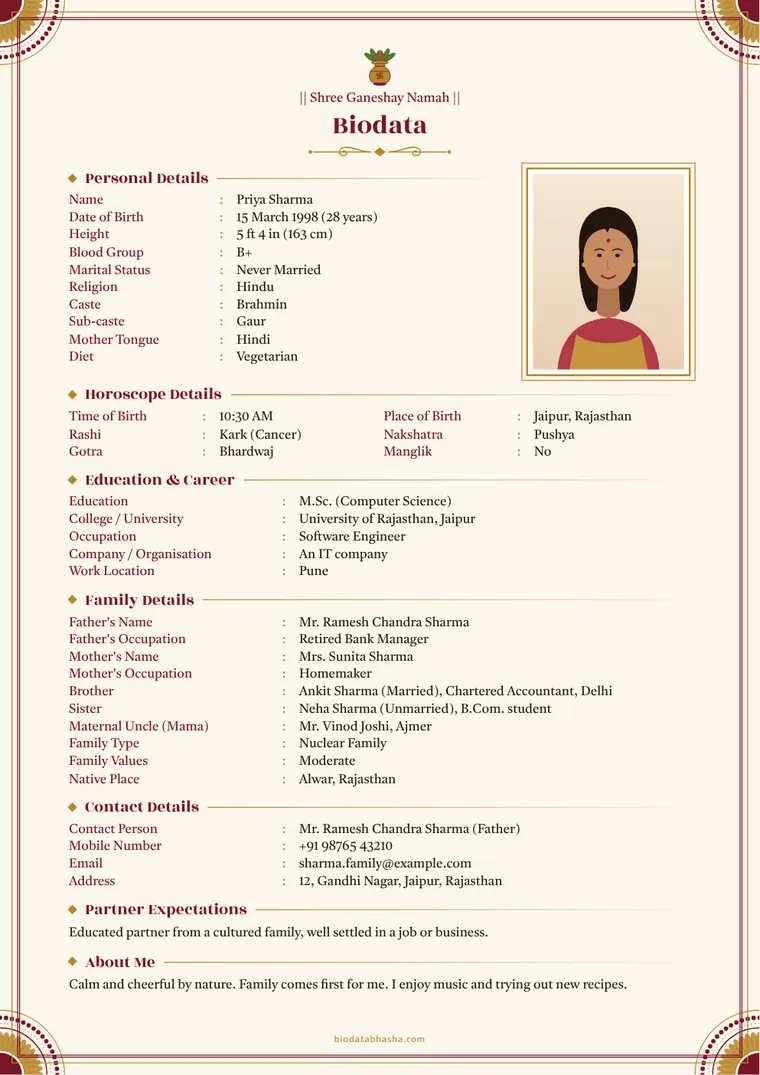
1. Collect the details first
Sit with your parents for ten minutes and note down: exact date, time and place of birth; height; education with colleges and years; job title, employer type and city; parents’ names and occupations; brothers and sisters (married or not, and what they do); maternal uncle (mama) and native place; and a phone number the family is happy to share.
2. Follow the order families expect
- Top line and title — a blessing such as “॥ श्री गणेशाय नमः ॥”, Bismillah, Ek Onkar or a Cross, then “Biodata”.
- Personal details — name, date of birth with age, height, marital status, religion, caste, mother tongue, diet.
- Horoscope details (if your family uses them) — time and place of birth, rashi, nakshatra, gotra, manglik.
- Education and career.
- Family details — parents, siblings, mama, family type, native place.
- Contact details.
- Partner expectations and a short about me.
BiodataBhasha uses exactly this order and lets you move sections up or down if your family prefers another order.
3. Write short, factual lines
Each line should be quick to read: “M.Sc. (Computer Science), University of Rajasthan” is better than a sentence. Keep “about me” to two or three sentences. See what to write in each field for examples.
4. Choose the language your family reads
Make the biodata in the language the elders on both sides read most comfortably. You can keep a second copy in English for relatives abroad. In BiodataBhasha, switching the language changes every heading and label while your details stay. See formats in Hindi, Marathi, Tamil and every other language.
5. Add a good photo
A recent, clear photo with a plain background and natural light matters more than the design. Read our photo tips; the built-in editor can crop, brighten and replace the background on your phone.
6. Pick a design that suits your family
Traditional families often like a red-and-gold design with a symbol on top; professionals often choose a clean modern one. Browse 110 designs; keep a black-and-white version for printing.
7. Check everything once
- Spellings of names (especially in Indian scripts) and the phone number.
- Dates: date of birth and time of birth in the right format.
- That the page fits on one sheet (the tool shrinks the text automatically, and warns you if it is still too long).
8. Share it the right way
On WhatsApp, send a light image or the text version first, then the PDF. For marriage groups, use a share link that hides your phone number until you approve a family. For printing, use the PDF.